
Ask
Ask questions across your meetings and get answers where every sentence cites what was said.
Where to ask
| To ask about | Use |
|---|---|
| All your meetings | The box on Home, Ask anything about your meetings, or the search palette |
| One project | Ask about on the project page |
| One meeting | Ask Furr about this meeting at the bottom of the meeting page |
In the search palette (⌘K on a Mac, Ctrl+K on Windows), type your question and press Enter on Ask about “…”, the first row. Ask opens and answers it in a new chat across all your meetings, as if you had typed it there, including the OK Ask asks for the first time (see Before anything is sent). If Ask cannot send it, because no engine is ready or another question is still being answered, the question waits in the box for you to send. ⌘Enter (Ctrl+Enter) asks from any row.
When Ask cannot take a question, the box is off and says why: Set up an engine to ask questions. when no engine is ready, Record a meeting first when you have no meeting yet, and Start a new chat to keep asking. when the chat already holds 20 questions. If a question from the palette is waiting in the box, the reason shows in a line under it.
When a question is about one meeting or project, the box shows In …. Remove it with × to ask across all your meetings instead. If a question names a project, Furrget narrows to that project by itself.
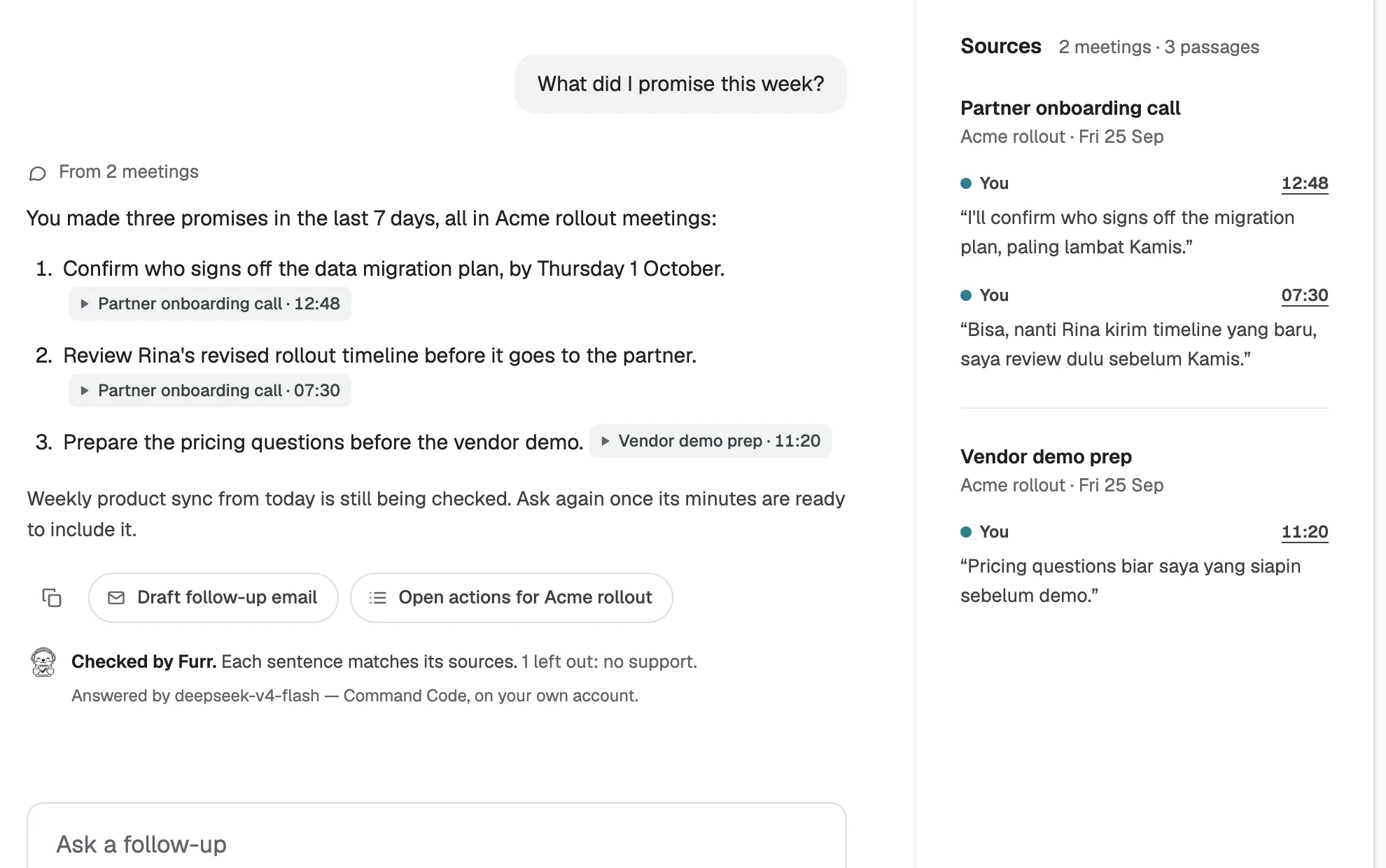
Chatting with Furr
Ask is a chat. Say hello, or mau tanya, and Furr answers in your language. Furr talks about your meetings and notes, and it can suggest ideas and next steps built on what was said. A question that is not about your meetings or notes gets a short, friendly no.
Each idea is marked Idea, and it sits apart from what was said. Furr does not check ideas. Facts from your meetings keep their sources and Furr’s check, as described under How an answer is made.
Small talk, such as a greeting or mau tanya, goes to the engine you pick under Answer with. Only your message and the chat so far are sent, never quoted lines from a search of your meetings, and nothing goes to the checking service. Under such a reply, the footer says Only your message was sent. when nothing else went, and Your message and this chat were sent. otherwise.
How an answer is made
- Furrget searches your meetings on your computer and picks the closest passages, up to 80.
- The checking service ranks them and sends the best 16 to the engine you picked. Up to 8 meetings get a place first, each with its best passage that matches the question, so a broad question also cites older meetings, not only the newest ones. The other places go to the highest scores. When a Confidential meeting is among the passages, they are not ranked (see Confidential meetings in Ask).
- The engine writes the answer. Every sentence must cite the passages it rests on.
- Furr checks each sentence against what it cites and leaves out any it cannot support.
While Ask works, Furr’s mark and a line say what it is doing, and the line opens into the steps so far (the meetings searched and read, the answer being written, the quotes being checked). When the answer is done, that line shrinks to a short summary with how long it took, and it still opens. Answers appear sentence by sentence as they are checked, and the thread follows them while you are at the end. If you scroll up to read, it stays put and offers Jump to latest. Under each one you see either Checked by Furr. Each sentence matches its sources. or Not checked by Furr, with the reason. Whether a chat is kept is your choice: see Saved chats.
The language of the answer
Ask answers in the language of your question: Indonesian for an Indonesian question, English for an English one. A question that mixes the two is answered in the language most of it is written in, and an Indonesian question word such as siapa or bagaimana counts for more than a few English words around it. A question that shows neither, such as a bare product name, goes on in the language of the chat so far, and in English when the chat has not shown one yet.
Names, meeting titles and product terms stay as your meetings write them, and the quotes in Sources stay as they were said. Furr checks an answer in either language, and the follow-ups come in the same one. Furr’s notes and the minutes stay in English.
Sources and follow-ups
- Sources lists each meeting and passage the answer used. Choose a chip inside the answer to see its passage in Sources, and the time on a passage to open that meeting.
- A chip for a meeting whose audio was deleted shows the time without the play mark. See Storage and old recordings.
- Follow-ups suggests next questions, and the box below takes your own. A suggestion appears only when it builds on something the answer or its sources say, so a short answer may have none, and an answer with no sentence kept has none. A chat holds up to 20 questions. Then start a New chat.
Saved chats
After any finished question, Furrget asks Keep your Ask chats? Until you answer, nothing from Ask is saved. Chats are saved only while the Keep Ask chats switch in Settings › Ask is on.
- Keep chats turns that on, and saves this chat as it stands, and every chat after it, on this computer next to your meetings. Nothing is uploaded by saving.
- Don’t keep saves none.
Once a chat is kept, it is saved even when its last question failed or was stopped.
With chats kept, the Ask page lists them under Chats, grouped by Today, Yesterday, This week and Older. Search chats finds one by its words, and Filter chats narrows the list to This meeting or This project when you ask from one. Open a chat to pick it up where you left it. Answered on … marks where the earlier answers end. Each row’s Chat options offer Rename and Delete, and a deleted chat comes back with Undo for 8 seconds. Saved chats also appear in the search palette.
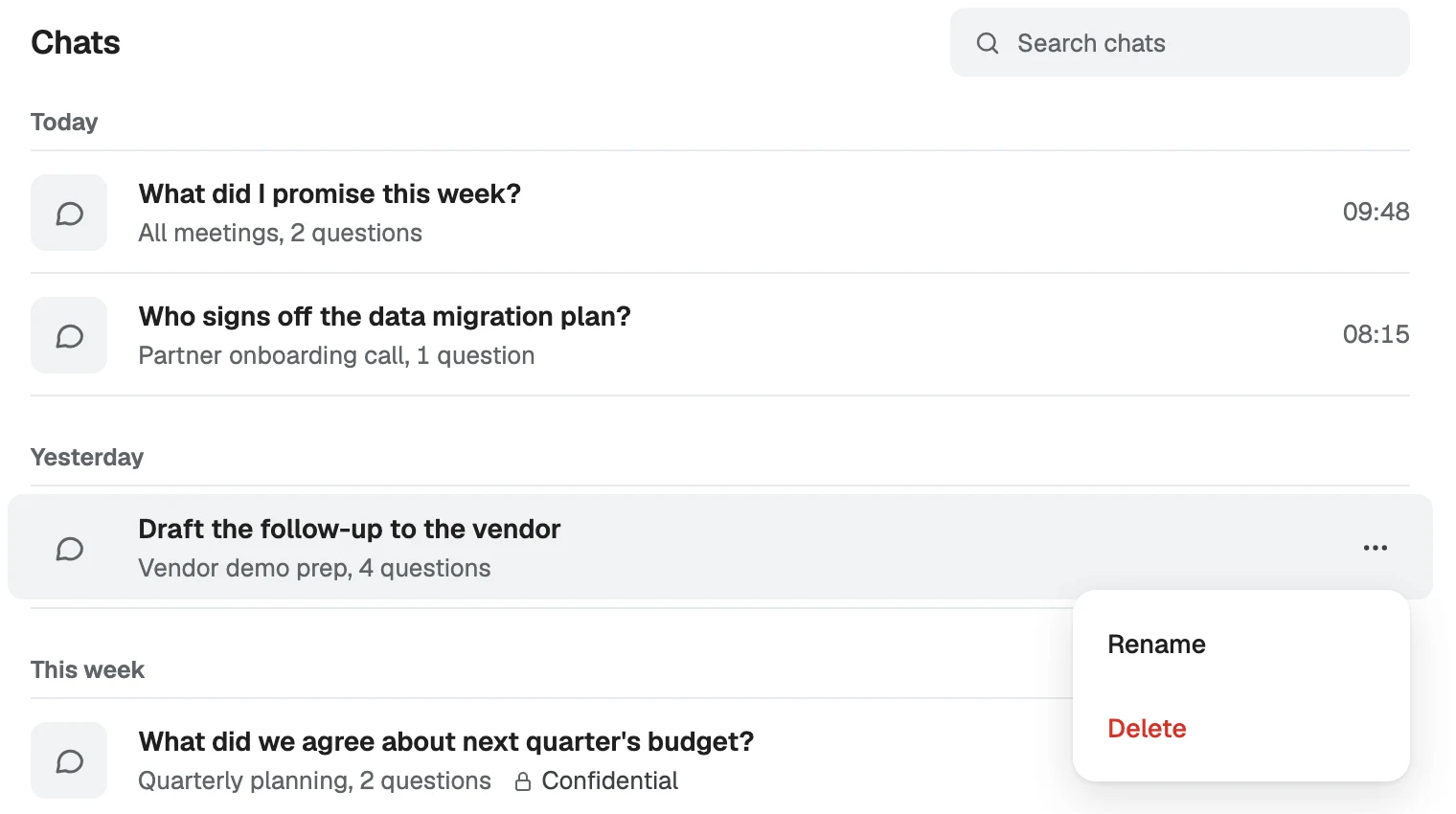
Settings › Ask has the Keep Ask chats switch, how many chats are saved and how much space they take, and Delete all chats…. Turning the switch off asks whether to delete the saved chats too (Keep them or Delete them). Either way, new chats stop being saved. When you delete a meeting, its quotes leave every saved chat too.
Picking the model
Answer with chooses the engine for Ask. Only ready engines can be picked. The others show what they need (key not set, not on this computer) and Set up…. Ask uses only the engine you pick, with no fallback.
When you are signed in, the menu lists Furrget’s engine first, with the models your plan offers (for example Fast), and Your own below it. The menu also shows how many questions your plan has left this month. If you have no engine of your own, Ask starts on Furrget’s. Each question on Furrget’s engine runs under its own short job, which closes when the answer is done. A footer under the answer says Answered by … on Furrget’s engine. If Furrget’s engine cannot be reached, the answer says Furr couldn’t reach Furrget’s engine right now. Try again in a moment. If the month’s limit is reached, Furrget is busy, or you need to sign in again, the answer says so and offers Pick another model, See usage or Sign in again. Signed out, the menu is the list of your own engines, as before.
Questions answered on your computer
Some questions never reach an engine. A question that only asks for your meetings, such as which meetings do I have this week, gets a list from your library: titles, dates and projects, newest first, up to 20, then a line saying how many more there are. Name a time to narrow it. Under the list, Ask says Nothing was sent. Nothing about it is checked or cited, because it is not about what was said. A greeting or a thanks is a chat instead, see Chatting with Furr.
Only plain wording takes this path. A longer question, or one with any word Furr does not expect, goes to the engine as before, and so does a very short follow-up to an answer the engine just wrote. A Confidential meeting’s title can appear in the list on your computer, but it is never offered as a suggested question, because choosing a suggestion sends it to the engine.
Before anything is sent
The first time, Ask shows what it sends: your question and quoted lines from your meetings, and to whom. Choose Ask with … to agree, or Pick another model. Furrget remembers each destination you agree to. If nothing in your meetings matches the question, nothing is sent and no permission is asked.
Confidential meetings in Ask
A Confidential meeting is used only when the engine runs on your computer. With an engine that sends text off your computer, Ask says so under the first answer the left-out meetings apply to:
2 Confidential meetings were left out, because Claude Code sends text off this Mac. A model on this Mac can include them. Set one up
The notice counts only the Confidential meetings the question reached: one with a word of the question in its notes or lines, one the answer before it cited, or the one meeting you ask about. A later answer that leaves out the same number does not repeat the notice, but a different number is told again. A question that reaches none starts the count over, so the next one that reaches a Confidential meeting tells it again.
Set one up opens Settings › Engines. Add an engine that runs on your computer there, as in Engines and keys, then choose it with Answer with. On Windows the notice says this PC. An answer that used a Confidential meeting is not checked by the checking service. A saved chat that read a Confidential meeting shows a lock, and its earlier questions never go to an engine that runs off this computer. A reply after a Confidential answer stays on this Mac’s rules, small talk included: it goes only to an engine on this computer, with the chat so far.
When there is no answer
- No meetings match that yet. Nothing in your meetings is close to the question.
- Nothing in your meetings answers that. There were passages, but none answered it. If Confidential meetings were left out as well, the count is told under it.
- The answer may be in the 2 Confidential meetings left out. Only Confidential meetings matched the question, and they were left out. See Confidential meetings in Ask.